


If you are an active developer in the agentic AI ecosystem, chances are your wallet already carries a few subscriptions. Between services like Kimi (Moonshot AI / Kimi Code)—renowned for its long-context reasoning and code synthesis—and OpenCode Go—the popular $10/month subscription aggregating high-throughput access to models like Kimi K3, GLM-5.3, and DeepSeek—the raw compute available to developers is staggering.
Yet, far too many developers keep these models locked inside default web interfaces or native CLI wrappers.
The real magic happens when you decouple the model provider from the agent runtime. By routing your Kimi or OpenCode Go subscriptions into dedicated autonomous agent environments like Zcode (Z.ai’s Agentic Development Environment) and Hermes Agent (Nous Research’s persistent, self-improving agent), you can transform a simple monthly API subscription into an autonomous software engineer.
Here is an end-to-end guide on extracting your subscription credentials and integrating them into Zcode and Hermes Agent.
The Big Picture: BYOK (Bring Your Own Key)
Most modern AI developer platforms are built on standard conventions: either the OpenAI Chat Completions specification (/v1/chat/completions) or the Anthropic Messages specification (/v1/messages).

Because both Kimi and OpenCode Go provide standards-compliant endpoints, you can plug them into virtually any Bring-Your-Own-Key (BYOK) agent harness.
Step 1: Gather Your Credentials & Base URLs
Before opening your agent tools, retrieve your keys and endpoints from each provider console.
1. Kimi (Moonshot AI / Kimi Code)
Kimi offers dedicated programming endpoints under its Kimi Code and Open Platform subscriptions:
- Provider Console: Log into the Kimi Code Console or Moonshot Open Platform.
- API Key: Generate a key (typically formatted as
sk-...ork-code-...). - Base URLs:
- OpenAI Compatible:
https://api.kimi.com/coding/v1(orhttps://api.moonshot.cn/v1) - Anthropic Compatible:
https://api.kimi.com/coding/ - Target Models:
kimi-k3,kimi-k2.5.
2. OpenCode Go
OpenCode Go curates a fleet of open and frontier coding models under a single monthly subscription:
- Provider Console: Go to OpenCode Zen / Account Settings → Subscriptions.
- API Key: Copy your OpenCode Go API token.
- Base URL:
https://opencode.ai/zen/go/v1(or the OpenAI-compatible proxy URL provided in your dashboard). - Target Models:
kimi-k3,glm-5.3-flash,deepseek-v4-flash,minimax-m3.
Step 2: Wiring Subscriptions into Zcode
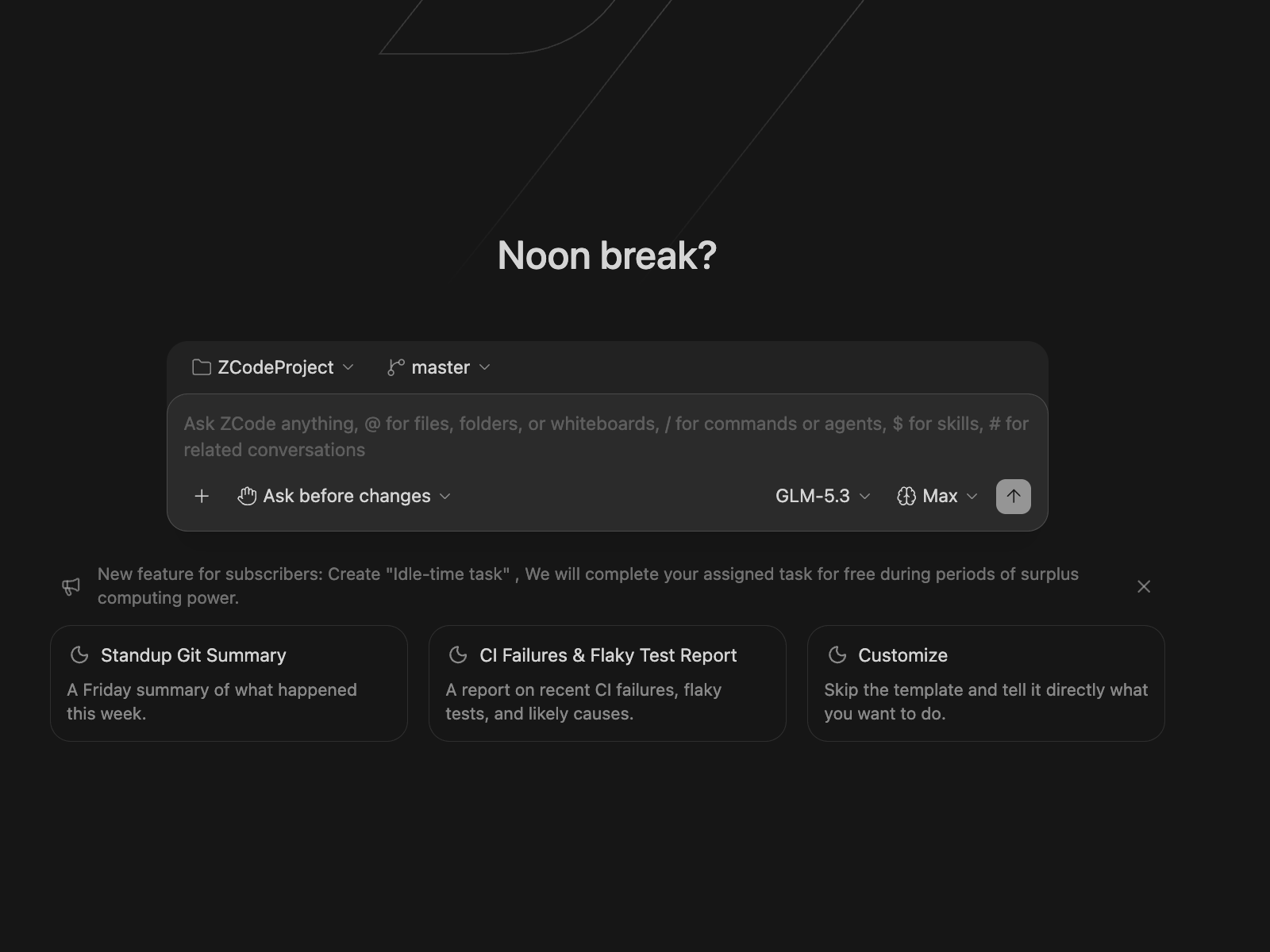
(Image source: Z.ai Zcode Documentation)
Zcode is an Agentic Development Environment (ADE) developed by Z.ai. Unlike conventional copilots that act as inline autocompleters, Zcode places an autonomous agent at the heart of your project, equipped with workspace-level file manipulation, multi-turn plan modes, subagents, and an integrated terminal.
While natively optimized for the GLM series, Zcode fully supports custom OpenAI- and Anthropic-compatible endpoints.
Option A: Using the Zcode GUI
- Launch Zcode and click the Model Selector dropdown at the bottom of the agent prompt bar.
- Click Manage Models → Settings → Model Settings.
- Click Add Provider.
To add Kimi Code:
- Provider Name:
Kimi Code - Protocol:
OpenAI Compatible - Base URL:
https://api.kimi.com/coding/v1 - API Key: Your Kimi API Key
- Models to add:
kimi-k3
To add OpenCode Go:
- Provider Name:
OpenCode Go - Protocol:
OpenAI Compatible - Base URL:
https://opencode.ai/zen/go/v1 - API Key: Your OpenCode Go Key
- Models to add:
glm-5.3-flash,deepseek-v4-flash,kimi-k3
Option B: Direct Configuration via config.json
If you prefer configuring via the CLI or dotfiles, edit your Zcode config file located at ~/.zcode/v2/config.json:
{
  "providers": [
    {
      "id": "kimi-code",
      "name": "Kimi Code",
      "protocol": "openai",
      "baseURL": "https://api.kimi.com/coding/v1",
      "apiKey": "sk-your-kimi-token-here",
      "models": [
        {
          "id": "kimi-k3",
          "name": "Kimi K3 (Coding Plan)"
        }
      ]
    },
    {
      "id": "opencode-go",
      "name": "OpenCode Go",
      "protocol": "openai",
      "baseURL": "https://opencode.ai/zen/go/v1",
      "apiKey": "sk-your-opencode-go-token",
      "models": [
        {
          "id": "deepseek-v4-flash",
          "name": "DeepSeek V4 Flash"
        },
        {
          "id": "glm-5.3-flash",
          "name": "GLM 5.3 Flash"
        }
      ]
    }
  ]
}
Once saved, restart Zcode. You will find your new models available directly in the task execution picker.
Step 3: Wiring Subscriptions into Hermes Agent
Hermes Agent by Nous Research is an open-source, self-improving terminal and background agent. It features persistent memory across sessions, custom subagents, automated skill synthesis, and multi-channel integration (Telegram, Discord, Terminal).
Hermes uses a decoupled architecture configured primarily through ~/.hermes/config.yaml for parameters and ~/.hermes/.env for secrets.
Method 1: Interactive Setup via CLI
The quickest way to configure custom endpoints in Hermes is the built-in wizard:
hermes model- Select Custom endpoint (OpenAI compatible) from the interactive menu.
- Base URL: Enter
https://api.kimi.com/coding/v1(or your OpenCode Go endpoint). - API Key: Paste your subscription key.
- Model Name: Enter
kimi-k3ordeepseek-v4-flash.
Hermes automatically validates the endpoint and writes the settings to your configuration profile.
Method 2: Declarative Setup via config.yaml and .env
For production or automated setups, configure your files manually.
1. Add secrets in ~/.hermes/.env:
# ~/.hermes/.env
KIMI_API_KEY=sk-your-kimi-key-here
OPENCODE_GO_KEY=sk-your-opencode-go-key-here
2. Configure the model and provider in ~/.hermes/config.yaml:
Hermes allows you to set your primary brain as well as offload auxiliary slots (such as session title generation, context compression, and vision) to cost-effective models:
# ~/.hermes/config.yaml

# Primary model used for reasoning and tool execution
model:
  provider: custom
  base_url: https://api.kimi.com/coding/v1
  default: kimi-k3
  api_key: ${KIMI_API_KEY}
  context_length: 262144

# Optimize costs: Use OpenCode Go's high-speed Flash models for auxiliary jobs
auxiliary_models:
  compression:
    provider: custom
    base_url: https://opencode.ai/zen/go/v1
    model: glm-5.3-flash
    api_key: ${OPENCODE_GO_KEY}
  title_generation:
    provider: custom
    base_url: https://opencode.ai/zen/go/v1
    model: deepseek-v4-flash
    api_key: ${OPENCODE_GO_KEY}

agent:
  max_turns: 30
  approval_mode: smart
Launch Hermes to verify your connection:
hermesPro-Tips & Gotchas When Running Subscriptions on Custom Agents
1. Watch Out for Tool-Call Formatting
Agent tools like Hermes and Zcode depend heavily on structured tool calling (Function Calling).
- Frontier models like Kimi K3 and GLM-5.3 have native tool-calling capabilities that handle Hermes’ internal commands (
write_file,execute_shell,browse_web) reliably. - If you run smaller open-weights models through OpenCode Go, they might occasionally wrap commands in Markdown markdown blocks rather than invoking the JSON tool schema. Adding a rule in your
SOUL.md(for Hermes) orAGENTS.md(for Zcode) explicitly stating “Execute tool calls directly using native JSON schemas without preliminary narration” fixes this immediately.
2. Rate Limits & Rolling Windows
- OpenCode Go operates on generous 5-hour request windows. Pushing an entire multi-repo refactoring loop through
kimi-k3on OpenCode Go can drain your 5-hour quota faster than expected. - Strategy: Set your routine coding / file exploration subagent in Zcode to
deepseek-v4-flashorglm-5.3-flash, reservingkimi-k3for complex architectural changes and plan reviews.
3. Take Full Advantage of Hermes’ Auxiliary Slots
In Hermes Agent, every message compression, summary, and title generation call consumes tokens. Leaving auxiliary slots on auto means you burn expensive Kimi reasoning tokens on background administrative tasks. By offloading those slots to a fast model on OpenCode Go, you ensure your primary budget is 100% focused on active coding.
Conclusion
The era of paying for a subscription only to use it inside a solitary web interface is over. With standardized OpenAI-compatible APIs, your Kimi and OpenCode Go subscriptions can power your entire agent fleet.
Pairing Kimi’s deep contextual reasoning with Zcode’s long-horizon IDE integration gives you a dedicated programming workstation, while linking OpenCode Go with Hermes Agent gives you a persistent, self-learning terminal operative that works 24/7 without breaking the bank.
Set up your endpoints, spin up your agents, and let your models do the heavy lifting!
Leave a Comment